在一处集中控制所有显示器
轻量级 Windows 工具,将亮度、对比度、输入切换和电源控制集成到系统托盘。专为使用多显示器的开发者和高级用户打造。
Download v1.1.8
Get the latest release
Why Monitor Control Manager?
Everything you need to get started quickly.
Instant Access
Control brightness, contrast, input sources, and power settings for all your monitors directly from the system tray. No more fumbling with physical buttons.
Multi-Monitor Made Easy
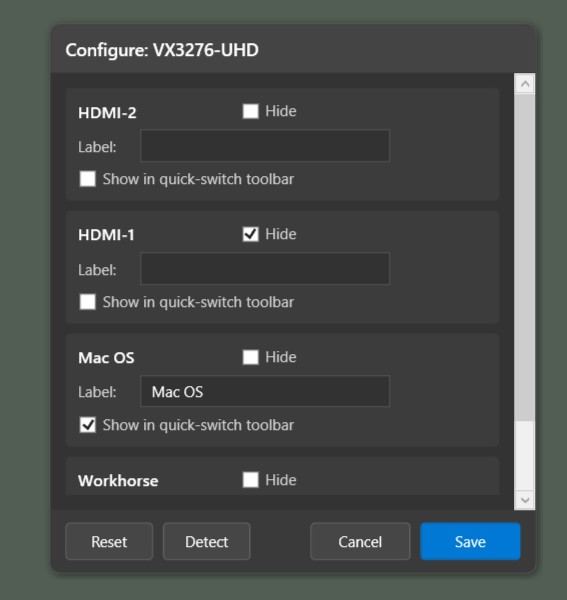
Manage all your DDC/CI compatible displays from a single interface. Configure custom port labels, hide unused inputs, and create quick-switch buttons for seamless workflow transitions.
Built for Productivity
One-click input switching, real-time slider controls, and automatic port detection. Designed for developers and power users who demand efficiency from their tools.
Features
Powerful capabilities at your fingertips.
系统托盘集成
从任务栏访问简洁的弹出界面。始终可用,从不碍事。点击控制,点击关闭。
智能输入切换
自动检测可用输入(HDMI、DisplayPort、DVI、VGA),并允许您为最常用的配置创建自定义快速切换按钮。
实时控制
使用响应式滑块调整亮度和对比度,提供即时反馈。实时查看调整效果。
端口检测与自定义
自动发现可用的输入端口,重命名以匹配您的设置,并隐藏未使用的端口,打造更简洁的界面。
电源管理
通过开机、休眠和关机命令控制显示器电源状态。包含系统恢复保护,防止缩放器锁定问题。
多语言支持
自动检测您的系统语言,支持英语、西班牙语、法语、德语、中文、日语、葡萄牙语、意大利语和印地语。
Ready to simplify your multi-monitor workflow?
Download Monitor Control Manager and take control of your displays in seconds. Free, open source, and built for Windows 10/11.
Get Started