Beheer Al Je Monitoren Vanaf Één Plek
Een lichtgewicht Windows-hulpprogramma dat helderheid, contrast, invoerschakeling en energiebeheer direct in je systeemvak plaatst. Gemaakt voor ontwikkelaars en power users met meerdere schermen.
Download v1.1.8
Get the latest release
Why Monitor Control Manager?
Everything you need to get started quickly.
Instant Access
Control brightness, contrast, input sources, and power settings for all your monitors directly from the system tray. No more fumbling with physical buttons.
Multi-Monitor Made Easy
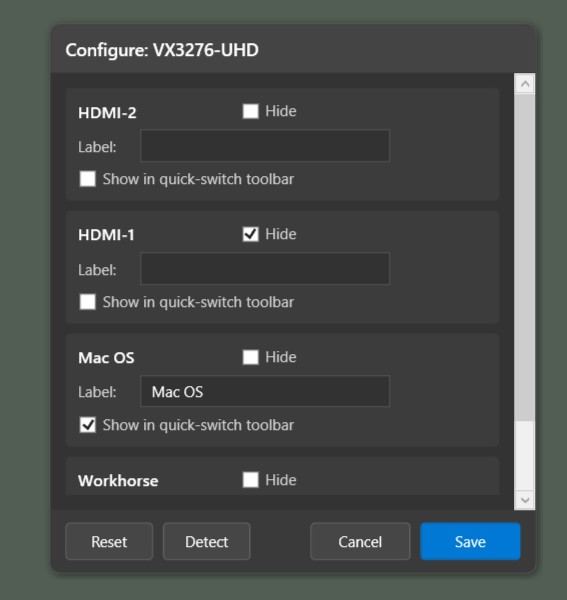
Manage all your DDC/CI compatible displays from a single interface. Configure custom port labels, hide unused inputs, and create quick-switch buttons for seamless workflow transitions.
Built for Productivity
One-click input switching, real-time slider controls, and automatic port detection. Designed for developers and power users who demand efficiency from their tools.
Features
Powerful capabilities at your fingertips.
System Tray Integration
Clean popup interface accessible from your taskbar. Always available, never in the way. Click to control, click away to close.
Smart Input Switching
Auto-detects available inputs (HDMI, DisplayPort, DVI, VGA) and lets you create custom quick-switch buttons for your most-used configurations.
Real-Time Controls
Adjust brightness and contrast with responsive sliders that provide instant feedback. See changes as you make them.
Port Detection & Customization
Automatically discover available input ports, rename them to match your setup, and hide unused ports for a cleaner interface.
Power Management
Control monitor power states with On, Sleep, and Off commands. Includes system resume protection to prevent scaler lockout issues.
Multi-Language Support
Auto-detects your system language with support for English, Spanish, French, German, Chinese, Japanese, Portuguese, Italian, and Hindi.
Ready to simplify your multi-monitor workflow?
Download Monitor Control Manager and take control of your displays in seconds. Free, open source, and built for Windows 10/11.
Get Started